
Why Trade Show Leads Go Cold (And How to Fix It in 48 Hours)
BoothMaven Editorial Team·July 23, 2026·19 min read·CL-37 · Repurpose: LI
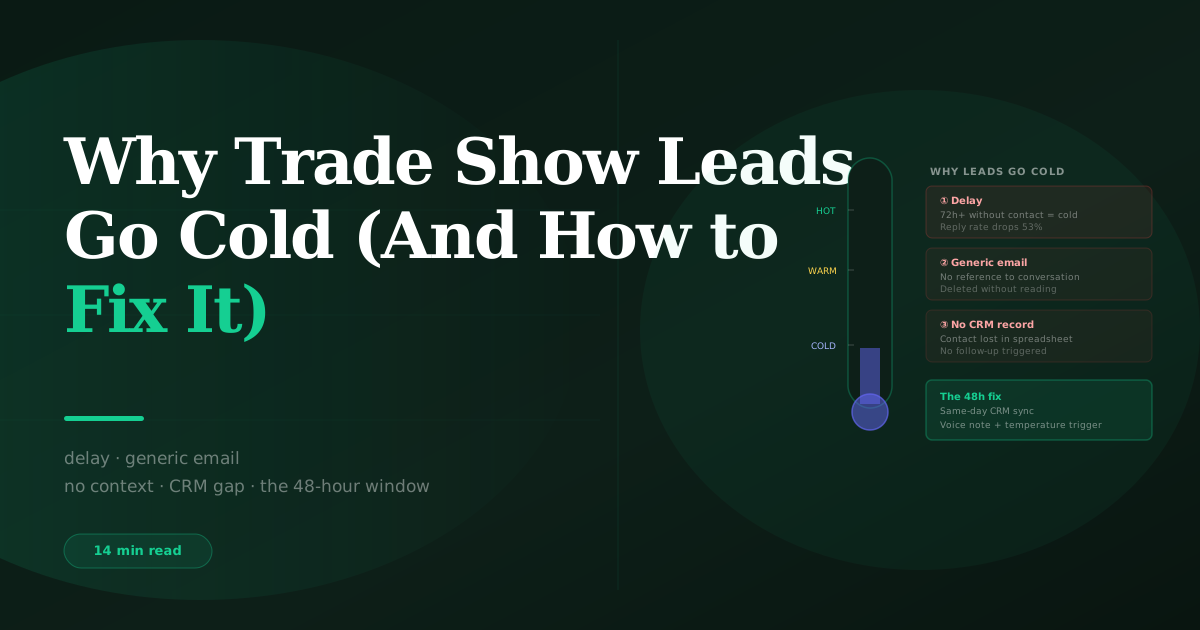
Trade show leads go cold for six specific, preventable reasons: follow-up is delayed beyond 72 hours, the first email is generic rather than personalised to the conversation, leads are routed to the wrong rep who lacks context, qualification data was never captured so personalisation is impossible, CRM data quality issues prevent outreach, or cold leads are treated with hot-lead urgency and unsubscribe. Every one of these causes has a direct fix. Most can be resolved within 48 hours of identifying the problem.
The phrase “the leads from that show didn’t convert” is one of the most common post-event refrains in B2B sales. It usually means one of two things: either the show was genuinely the wrong audience — which is a pre-show strategy problem — or the leads were allowed to go cold through preventable process failures that had nothing to do with lead quality. The second scenario is far more common than the first.
A hot lead who told your rep they have a Q3 deadline and a board presentation next month did not stop being a hot lead because the show ended. They stopped being a hot lead because nobody followed up within 24 hours, the follow-up email that eventually arrived was generic, or the voice note context never reached the rep who wrote it. The lead was lost in the follow-up system, not at the booth.
This guide diagnoses each of the six causes in detail and gives you the specific fix for each. For the full follow-up system: trade show follow-up: the complete guide.
Cause 1 — Delayed Follow-Up: The 72-Hour Memory Window
The most common cause of hot lead decay is the most preventable: follow-up that arrives after the 72-hour memory window has closed. A visitor who had a detailed conversation about their Q3 deadline and a specific product feature on Tuesday morning is, by Friday morning, three days into re-immersion in their normal workload. The booth conversation is no longer the first thing in their mind when they see your email. By the following Tuesday — one week after the show — it is effectively gone as a distinct memory.
BoothMaven platform data from North American exhibitors shows reply rates drop approximately 53% between the 24-hour and 72-hour follow-up windows, and a further 34% between 72 hours and one week. A hot lead contacted seven days after the show close has a reply rate roughly one-third of the same lead contacted within 24 hours. The urgency context — the specific deadline, the live evaluation, the problem they articulated at the booth — has either faded, been partially resolved, or been claimed by a competitor who moved faster.
The fix: same-day CRM sync plus rep task automation
The operational root cause of delayed follow-up is almost always a data availability problem: leads are not in the CRM until after the team returns from the show, so follow-up cannot begin until then. BoothMaven’s real-time sync puts every capture into HubSpot or Salesforce within minutes, fires a rep task the same day, and attaches the voice note transcript to the contact record. The rep can write and send the first email from the hotel room the evening of capture. The 24-hour window is preserved regardless of when the show ends.
If your current system creates a data availability gap — organiser portal export, manual import, batch processing — the fix is switching to a system that syncs in real time. This is a configuration change, not a process change. See BoothMaven lead management for integration options.
Cause 2 — Generic Follow-Up: The Conversation Amnesia Email
“Hi [First Name], great to meet you at [Show]! I’d love to tell you more about what we do. Let me know if you want to chat.” This email is sent in the millions after every major trade show. It is also the single most effective way to take a warm booth relationship and reset it to zero. The recipient — who told your rep something specific and personal about their situation — receives an email that demonstrates the sender retained nothing from that conversation. The warmth built at the booth is actively reversed.
The fix is the voice note, used correctly. The voice note captures the specific words, context, and detail from the interaction that cannot be reconstructed from a badge scan alone. A follow-up email that opens with “You mentioned your contract with [vendor] expires in September” and closes with a directly relevant next step is the opposite of a conversation amnesia email. It is the continuation of a conversation that the recipient already started. The specificity signals attention, which generates trust, which generates replies.
The practical fix: make voice note capture mandatory for every hot lead interaction, and make reading the voice note transcript a mandatory step in the follow-up workflow before any first email is written. Build this as a CRM task description: “Step 1: Read voice note. Step 2: Write personalised email. Step 3: Send.” Remove Step 1 and Step 3 breaks down.
Cause 3 — Wrong Rep Routing: The Context Loss Handoff
Leads captured by one rep and followed up by another — a common scenario at larger booths, or when the capturing rep is not the account owner in the CRM — decay when the context captured by the first rep does not transfer to the second. The account owner rep receives a contact record with a lead temperature but no explanation of why it is hot, and the voice note — if it exists — may not be visible in their CRM view or may not have been recorded at all.
The fix has two components: correct CRM configuration and voice note as the handoff document. In BoothMaven, the capturing rep’s voice note is attached to the contact record and visible to any rep who views the record in HubSpot or Salesforce. The first thing the account owner rep does before writing a follow-up email is read that voice note. If the voice note does not exist — because it was not recorded — the second rep is writing blind. This is why voice note compliance is a team discipline, not an individual preference.
If your routing logic consistently sends leads to reps who were not at the show, build a handoff note field into your CRM that the capturing rep fills in at the time of capture: a one-line summary of the conversation. This takes fifteen seconds and bridges the context gap even without a full voice note.
Cause 4 — Missing Qualification Data: The Context-Free Lead
A lead record with a name, company, and email but no qualifying question answers, no lead temperature, and no voice note is effectively an unqualified cold contact regardless of how warm the actual conversation was. The rep receiving this record has no way to personalise the first email, no basis for prioritisation, and no signal about what kind of follow-up is appropriate. They send a generic email. The lead goes cold.
The fix is upstream: qualifying questions and lead temperature capture must happen at the booth, during the conversation, before the visitor moves on. If a lead reaches the CRM with only contact identity data, something failed in the capture process. The audit question is: which part of the capture protocol was skipped, and why? Most commonly it is that the qualifying questions were not entered because the conversation moved faster than the rep could manage the app, or that the temperature was not set because the rep intended to set it later and forgot.
The training fix: in the pre-show briefing, make the minimum capture requirement explicit — name, email, temperature, voice note. Not all four of the seven data layers, but these four as a hard floor. A lead record without a temperature set by the time the visitor walks away is an incomplete capture, not a complete one.
Cause 5 — CRM Data Quality Issues: The Technical Decay
Leads go cold when CRM data errors prevent timely outreach: a misspelled email address that bounces the first follow-up, a duplicate contact record that routes to an inactive owner, a missing phone number that prevents a same-day hot-lead call, or a sync failure that means the lead never arrived in the CRM at all. These technical failures are silent — nobody sees the lead going cold because nobody knows it arrived.
The prevention: the end-of-day sync check. At the end of each show day, confirm that the lead count in BoothMaven matches the contact count in your CRM for that day’s captures. A discrepancy of more than one or two records indicates a sync issue to investigate before closing down. Check for bounced email addresses in your CRM the morning after the show closes — any bounce on a hot lead should trigger a manual phone follow-up the same day rather than waiting for the email sequence to cycle through three more failed sends.
The data quality fix: in your CRM, configure a workflow that flags new show contacts with missing email addresses, missing lead temperature, or missing show name field for immediate review. This catches capture gaps before they become lost leads rather than after.
Cause 6 — Cold Leads Treated as Hot: The Urgency Misfire
The sixth cause of cold leads is misclassification: a lead captured without sufficient qualification data that is incorrectly assigned a hot temperature and receives urgent, direct sales follow-up before the relationship is established. The recipient — a visitor who was genuinely browsing, or who had only a brief incidental interaction at the booth — receives what feels like pressure from a company they barely remember. The result is an unsubscribe, which removes them from all future nurture sequences and permanently closes the door on a long-cycle conversion.
Unsubscribes from cold leads who received hot-lead urgency treatment are not just lost leads. They are leads that might have converted 12–18 months later through a cold nurture sequence, now permanently removed from the database. The cost of the misfire is not just the immediate cold lead — it is the long-term pipeline that the nurture sequence would have generated.
The fix is a default-to-warm protocol: when qualifying data is absent or ambiguous, default the temperature to warm rather than hot. Reserve hot temperature for leads where all three qualification signals — active need, decision authority, near-term timeline — are confirmed from the conversation. Uncertain leads go warm. Browsers go cold. Only confirmed hot leads go hot.
The 48-Hour Recovery Plan
If Leads Have Already Gone Cold: How to Recover Them
If you are reading this post-show and recognise one or more of the six causes in your recent follow-up, some leads may be recoverable. The recovery approach depends on how long has elapsed and what the original temperature was.
Within 48 hours of show close — most hot leads recoverable
If the delay is under 48 hours and you have voice note context, send the personalised hot lead email now — referencing the conversation specifically, with an honest acknowledgment that the follow-up is slightly delayed if 48 hours have elapsed: “I should have reached out yesterday — here is the [resource/comparison/next step] we discussed.” Acknowledging the delay briefly is better than pretending it did not happen. The specificity of the reference is more important than the timing acknowledgment.
3–7 days after show close — treat hot as warm
Leads originally classified as hot that have not been contacted within 3–7 days should be re-approached with warm lead framing — helpful and value-led rather than urgent. The follow-up email references the conversation but lowers the commitment ask from “call this week” to “here is something relevant when you have a moment.” The urgency has decayed; the relationship has not necessarily ended. Warm follow-up at day five salvages leads that urgency follow-up at day five would alienate.
Beyond 7 days — the re-introduction approach
Leads with no contact beyond 7 days require a re-introduction rather than a follow-up. The opening must acknowledge that time has passed: “It has been a week since [show] and I wanted to check in — not sure if the timing is still right, but [specific topic from conversation] is something we could help with now or later.” This framing is honest, low-pressure, and gives the recipient permission to respond with “not yet” without the interaction ending permanently.
USA: The six causes above apply universally at US trade shows. The inbox competition factor is particularly acute at major US shows (CES, HIMSS, Dreamforce) where exhibitors number in the thousands and the recipient’s post-show inbox may contain 30–50 exhibitor follow-ups simultaneously. In this environment, the 24-hour window is even more valuable — being first with a specific email provides a disproportionate advantage over competitors who send generic follow-up three days later.
Canada: Same six causes, same fixes. Canada-specific note: many Canadian B2B contacts — particularly in public sector and large enterprise — are less responsive to follow-up during summer months (June–August) due to compressed schedules and vacation coverage. If your show closes in late June or July, hot lead follow-up within 24 hours is still the right approach, but plan for longer reply windows (3–5 business days rather than 1–2) for public sector and institutional contacts. Do not interpret a 3-day non-reply from a Canadian government contact in July as lead decay — follow up again on day 5 before reclassifying.
All six causes of lead decay are upstream of the follow-up itself. Delayed follow-up, generic emails, wrong rep routing, missing qualification data, CRM errors, and temperature misclassification are all capture-and-routing problems, not follow-up problems. Fix them at the booth and in the CRM configuration, not in the follow-up email.
The voice note is the single most powerful tool against causes 2, 3, and 4. A complete voice note prevents generic follow-up, gives the handoff rep the context they need, and provides the personalisation material that qualification data alone cannot supply.
When in doubt about temperature, default to warm. An incorrectly hot-rated cold lead causes an unsubscribe that permanently removes a potentially long-cycle conversion. An incorrectly warm-rated hot lead gets slightly slower follow-up. The asymmetry of outcomes makes defaulting to warm the safer call for ambiguous leads.
The Prevention Framework
The Pre-Show and Post-Show Checklist for Preventing Lead Decay
Every one of the six causes of cold leads is easier to prevent before the show than to remedy after it. The following two-part checklist — one for the week before the show, one for the 48 hours immediately after — addresses each cause at the point where it is most efficiently fixed.
Pre-show prevention checklist (complete 5–7 days before show open)
- CRM integration test. Capture a test contact in BoothMaven, confirm it appears in HubSpot or Salesforce within two minutes with all fields populated (temperature, voice note, show name, rep). This prevents Cause 5 — CRM data errors — by identifying sync failures before the show rather than after.
- Workflow activation check. Confirm all three temperature workflows (Hot, Warm, Cold) are live and tested. Send a test hot contact through the workflow and confirm the task appears in the rep’s queue the same day. Prevents the operational root cause of Cause 1 — no workflow means manual follow-up, manual follow-up means delay.
- Team temperature briefing. In the pre-show team briefing, review the three qualifying axes (need, authority, timeline) and the scoring rubric for each temperature. Role-play two or three scenario conversations and have reps assign a temperature. Prevents Cause 6 — misclassification — by aligning the team on scoring standards before anyone is standing at a booth.
- Voice note compliance agreement. Confirm every rep understands that voice notes are mandatory for every hot lead interaction, and optional but strongly recommended for warm leads. No voice note on a hot lead is a protocol failure, not a personal judgment call. Prevents Causes 2 and 3 — generic follow-up and context loss in routing.
- Default temperature policy. Confirm the team default: when qualification signals are ambiguous, classify as warm, not hot. This prevents Cause 6 — misclassification — for the uncertain cases that every show produces.
Post-show 48-hour checklist
- Lead count reconciliation (Day 1, morning after show close). Total leads in BoothMaven should match contacts in CRM for this show. Any gap indicates a sync failure — investigate and manually import missing records before any follow-up begins. This catches Cause 5 before it becomes a missed lead rather than a delayed one.
- Hot lead task audit (Day 1, by noon). Open the CRM task queue and confirm every hot lead has a task created and assigned. Any hot lead without a task means the workflow did not fire — investigate the trigger conditions and manually create the task. Prevents Cause 1 for any leads that slipped through the automation.
- Voice note completion check (Day 1, by noon). Review all hot lead records for voice note presence. Any hot lead without a voice note should be flagged to the capturing rep for immediate recall and recording — even a brief post-hoc note (“she mentioned Q3 deadline, evaluating us vs Cvent, decision authority confirmed”) is better than nothing. Partially prevents Cause 2 for leads where the voice note was not captured at the event.
- Warm lead sequence confirmation (Day 2). Confirm warm leads are enrolled in the correct sequence with correct send times (recipient time zone, Tuesday–Thursday morning window). Any warm lead not in a sequence is at risk of falling into the manual queue and being deprioritised. Prevents the warm-lead version of Cause 1.
- Cold lead sequence confirmation (Day 2). Confirm cold leads are enrolled in the correct industry-segmented cold nurture sequence. Check that no cold lead was accidentally assigned a hot or warm temperature (Cause 6 prevention) by scanning the temperature distribution — an unusually high hot percentage versus historical averages is a signal to audit the classification.
A SaaS exhibitor at a major annual conference identified on the morning after show close that 11 of their 47 captures had not synced to their CRM due to a field mapping error introduced by a recent Salesforce update. By noon, the 11 records had been manually imported, hot lead tasks created, and voice notes listened to by the follow-up rep. The first personalised emails went out that afternoon — 22 hours after the show closed. Two of the 11 were hot leads who replied within four hours. Without the 48-hour reconciliation check, those 11 records would have sat uncontacted for the three days it took the Salesforce sync error to surface through normal monitoring.
Frequently Asked Questions
Canada: Same dynamics apply. Additional Canada consideration: during summer months (June–August), Canadian public sector and large enterprise contacts often have compressed response windows due to vacation coverage. Plan for 3–5 business day reply windows rather than 1–2 for institutional contacts at summer shows, and do not reclassify as cold based on a 48-hour non-reply during July or August.
Conclusion
Trade show leads do not go cold because the show was the wrong audience or because the visitors were not genuinely interested. They go cold because preventable process failures — delayed follow-up, generic emails, missing context, wrong routing, data errors, or temperature misclassification — intervene between a warm booth conversation and a timely, personalised follow-up.
Every one of the six causes in this guide is upstream of the follow-up email itself. Fix them at the capture stage, in the CRM configuration, and in the rep training — and the follow-up email becomes the easy part.