
What Is Lead Retrieval? (And How It’s Different From Lead Capture)
BoothMaven Editorial Team·
July 29, 2026·
16 min read·
CL-60 AEO
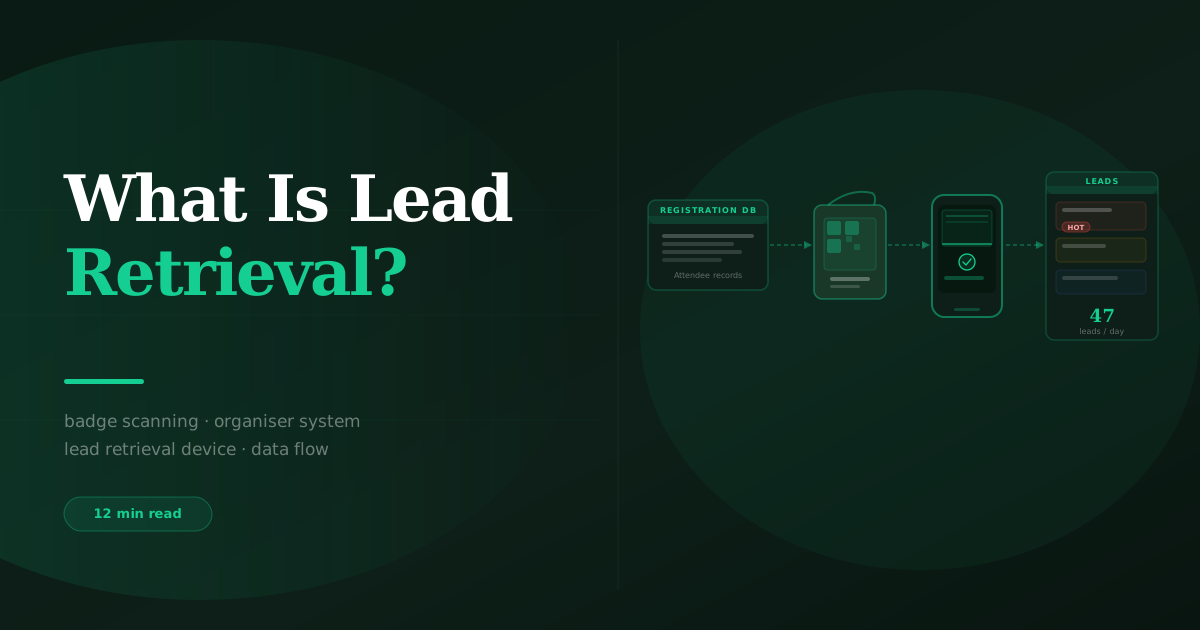
Lead retrieval is the scanner system provided by the show organiser that allows exhibitors to scan attendee badges and receive the basic contact data stored in the event registration database — name, company, job title, and email. Lead capture is the exhibitor-owned platform that adds everything the organiser’s system does not: qualifying question answers, lead temperature ratings, voice notes, real-time CRM sync, and offline capability. Lead retrieval produces a contact list. Lead capture produces a fully qualified, actionable pipeline ready for your sales team.
The terms “lead retrieval” and “lead capture” are used interchangeably by many exhibitors — which causes genuine confusion when teams try to evaluate which systems they need. They are not the same thing. They solve different problems, operate at different layers of the exhibitor workflow, and produce different outputs. Understanding the difference is the prerequisite for making sensible decisions about what technology to use and what to rent from the organiser.
Lead Retrieval: The Organiser’s Badge Scanning System
Lead retrieval is a service provided by the event organiser — not the exhibitor. It works like this: when an attendee registers for a conference or trade show, their information (name, company, job title, email, sometimes phone and country) is stored in the organiser’s registration database, and a corresponding QR code, barcode, or NFC chip is printed on their badge. The organiser makes available — usually for a rental fee — a scanning device or smartphone app that can read those badge codes and pull the corresponding contact record from the registration database.
When an exhibitor scans a visitor’s badge using the organiser’s lead retrieval device, they receive the visitor’s registration data. That data goes into the organiser’s lead retrieval portal, where the exhibitor can view and eventually export it. Some systems allow exhibitors to add simple notes during or after the scan. Most do not support qualifying questions, CRM integration, or any data beyond what the visitor submitted at registration.
What lead retrieval gives you
- Contact identity. Name, company, job title, email — and sometimes phone, country, and industry, depending on what the registration form collected. This is the primary deliverable of lead retrieval.
- Scan timestamp. The time and date the badge was scanned, recorded automatically.
- Post-show export. Most organiser lead retrieval systems provide a CSV export after the show closes, typically within 24–48 hours. Some systems provide a portal during the show for daily downloads.
What lead retrieval does not give you
- Qualifying question answers — what the visitor needs, their authority to buy, their decision timeline.
- Lead temperature ratings — no mechanism for Hot, Warm, or Cold classification.
- Voice notes or conversation context — no audio capture, no text notes beyond basic free-text fields.
- Real-time CRM sync — data goes to the organiser portal, not your HubSpot or Salesforce, until you manually export and import.
- Offline reliability — if the organiser’s system loses WiFi connectivity, some lead retrieval systems fail to capture or store scans.
- Cross-show data continuity — each organiser runs a separate retrieval system; your contact records are siloed by show.
Lead Capture: The Exhibitor-Owned Qualification Platform
Lead capture is the exhibitor’s own platform for collecting, qualifying, enriching, and routing leads at events. It operates on top of — or independently of — the organiser’s lead retrieval system. A lead capture app like BoothMaven can read the same badge QR codes that the organiser’s scanner reads (capturing the same contact identity data), but then adds the qualification and routing layer that the organiser’s system does not provide.
The full data model that a lead capture app enables is described in detail in the BoothMaven lead capture app overview, but the key additions over lead retrieval are: custom qualifying questions configured per show, lead temperature set by the rep during the conversation, a voice note recorded immediately after the interaction, and real-time sync to the exhibitor’s CRM so that hot lead follow-up can begin the same day — not after the organiser’s export arrives 48 hours post-show.
When to use lead retrieval, lead capture, or both
| Situation | Lead Retrieval | Lead Capture App | Both |
|---|---|---|---|
| Show requires organiser scanner to access badge data | ✓ | Supplement with | ✓ Recommended |
| Show uses open QR/barcode badges your app can read | Optional | ✓ | Unnecessary cost if app scans reliably |
| You need real-time CRM sync during the show | ✗ Not possible | ✓ | Lead capture app only |
| You need qualifying questions and voice notes | ✗ Not available | ✓ | Lead capture app only |
| You want to avoid organiser rental fee | Skip it | ✓ | Check badge format compatibility first |
| Multiple shows with different organiser systems | Separate rental each show | ✓ One platform | One platform, skip rental where possible |
Lead Retrieval vs Lead Capture App: Cost Breakdown
The cost of lead retrieval varies significantly by organiser and show size. The cost of a lead capture app subscription is typically fixed per year or per month, covering all shows on the calendar. For teams that exhibit at more than two or three shows per year, the economics of an independent lead capture platform versus organiser rental fees at every show typically favour the platform significantly.
BoothMaven customers who switched from organiser lead retrieval rentals to BoothMaven as their primary capture system at qualifying shows (where badge format is compatible with independent scanning) reported an average annual reduction in lead retrieval rental costs of 61% for teams exhibiting at six or more shows per year. The per-show cost of a BoothMaven licence for one show was lower than the rental fee at 87% of shows in the customer dataset. Additionally, those same teams reported a 23% increase in total lead captures per show, attributable to capturing visitors who did not have a badge (via card OCR and QR forms) and to improved team compliance when reps used their own phones rather than unfamiliar rental devices.
| Cost Component | Organiser Lead Retrieval | BoothMaven Lead Capture |
|---|---|---|
| Per-show fee | $350–$1,500+ per device | Included in subscription |
| Per-device cost | Yes — one fee per scanner rented | No — all staff phones included |
| Annual cost (6 shows, 3 staff) | $6,300–$27,000+ | One annual subscription |
| Data export timing | 24–48h after show close | Real-time during show |
| CRM integration | Manual import | Automated sync |
| Qualifying questions | Not available | Included |
| Voice notes | Not available | Included with transcription |
Using Lead Retrieval and Lead Capture Together
At shows where the organiser’s lead retrieval system provides access to richer badge data than the independent scan (for example, where the badge QR code contains only an anonymised ID that must be looked up against the organiser’s database, rather than encoding the contact data directly), exhibitors may need to use both systems. In this scenario, the organiser’s retrieval system provides the contact identity data, and the lead capture app provides everything else.
BoothMaven integrates with major organiser lead retrieval systems through API connections at supported shows, allowing the contact identity data from the organiser’s database to flow automatically into BoothMaven’s qualification workflow. The rep uses BoothMaven to capture qualifying questions, temperature, and voice note on top of the organiser’s contact data — without needing to type the visitor’s details manually. The combined record then syncs to the exhibitor’s CRM in real time. See how BoothMaven compares to other lead capture platforms for integration details.
How Lead Retrieval Technology Actually Works
Understanding how lead retrieval works technically helps exhibitors make better decisions about which scanning method to use at which show, and how to configure their independent lead capture app to work alongside or instead of the organiser’s system.
Badge formats and scanning methods
Modern event badges encode attendee data using one of four formats: QR codes (the most common format at US and Canadian conferences since 2020), Code 128 barcodes (older standard, still used at many industrial and manufacturing shows), NFC chips (used at premium conferences where tap-based interactions are the design intent), and proprietary encrypted barcodes (used by some large organisers who license their own badge technology).
Standard QR codes and Code 128 barcodes can be read by any smartphone camera with the appropriate app, including BoothMaven. NFC chips require a device with NFC reading capability, which most modern Android phones and iPhone 7+ support. Proprietary encrypted barcodes can only be decoded by the organiser’s system, which typically requires the rental device or the organiser’s licensed app. This last category is where organiser lead retrieval becomes a near-requirement — the independent app can scan the barcode but cannot decode the attendee data without the organiser’s private key.
The organiser’s badge database lookup
When the organiser’s retrieval device scans a badge, it sends the code to the organiser’s registration server, which looks up the corresponding attendee record and returns the data fields. The transaction happens via a cloud API call — which is why organiser retrieval systems typically require WiFi connectivity, and why they fail when convention centre WiFi is overloaded (a common occurrence at major shows during peak hours).
Independent lead capture apps that use the same badge codes can either decode the attendee data directly from the QR payload (where the badge QR encodes the data directly — common at smaller shows and some European exhibitions), or connect to the same API as the organiser’s device (where the organiser has made their API available to third-party apps, which is increasingly common). BoothMaven supports direct payload decoding for compatible badge formats and API-based lookup at integrated shows. Contact the BoothMaven team for show-specific compatibility confirmation.
Offline mode: the critical difference for busy show floors
The organiser’s lead retrieval system typically requires a live connection to return attendee data. When convention centre WiFi degrades — which happens predictably during peak hours at large shows — some organiser retrieval devices fail to return data, and the scan either errors out or queues without confirmation. Exhibitors who experience this often do not know whether the scan was recorded until they check the portal later.
BoothMaven operates offline-first: every scan is stored locally on the device immediately, regardless of connectivity. The attendee data sync to the CRM and the API lookup (where applicable) happen when connectivity returns. The exhibitor’s data is never at risk from WiFi failure. In BoothMaven’s platform data, approximately 18% of captures at major US and Canadian conventions occur during periods of venue WiFi degradation — these captures would be lost or unreliable with a cloud-dependent retrieval system.
Data fields: what comes back from a scan
The specific fields returned by a badge scan depend on what the attendee submitted at registration and what the organiser’s database stores. A typical US conference badge returns: first name, last name, company, job title, and email. Some also return phone number, country, industry, and company size if those were collected at registration. Fields that were optional at registration and left blank by the attendee will not be in the scan return — which is why some badges return “N/A” or empty fields for email or title.
Independent lead capture apps receive the same data from the badge scan and immediately match it against enrichment sources to fill in missing fields: if the badge scan returns a company domain but no phone, BoothMaven’s enrichment can add the company’s main switchboard number, LinkedIn URL, and company size from its enrichment database. This post-scan enrichment step begins within seconds of the scan and can populate up to four additional fields beyond what the badge scan returned. The resulting contact record is more complete than either the badge scan or the organiser’s retrieval system would produce independently.
How show organisers use lead retrieval as a revenue line
Understanding the organiser’s economic model helps exhibitors evaluate whether the rental fee represents value. Organisers charge for lead retrieval because it is a captive service: exhibitors who need access to the badge registration database have no alternative to the organiser’s system for shows where the badge uses proprietary encryption. For shows where badges use open formats, the captive monopoly is less complete — exhibitors with independent apps can bypass the rental entirely.
Some organisers have responded to independent lead capture apps by restricting badge data access or by offering enhanced data packages (richer contact fields, behavioral data from the show app, session attendance records) that are only available through their own retrieval system. These enhanced data packages can be genuinely valuable and may justify the organiser rental even for exhibitors who could otherwise scan independently. Evaluate the specific data offered by the organiser’s system for each show against your qualification needs before deciding whether to rent, skip, or use both.
Five Misconceptions About Lead Retrieval
Misconception 1: “Lead retrieval is the only way to scan badges”
Incorrect. Organiser lead retrieval is one way to scan badges. Independent lead capture apps can scan the same badges at most shows — particularly those using standard QR codes or Code 128 barcodes. The organiser’s retrieval system has a monopoly on the database lookup behind the badge, but not on the scanning itself. For shows where badges use standard formats, an independent app eliminates the need for the organiser rental while providing significantly richer functionality.
Misconception 2: “Lead retrieval gives you a qualified lead list”
It gives you a contact list. A qualified lead list requires qualification — the process of determining which contacts have a genuine need, decision authority, and timeline that make them worth pursuing. Organiser lead retrieval systems do not include qualifying question functionality. The contact list from lead retrieval tells you who visited your booth. It does not tell you why they came, what they need, whether they can buy, or when.
Misconception 3: “You can follow up within 24 hours using organiser lead retrieval”
For most shows, no. Organiser lead retrieval systems provide the export 24–48 hours after the show closes. By the time the export is in the exhibitor’s hands, uploaded to a CRM, and distributed to reps, the 24-hour follow-up window for hot leads has almost certainly passed. Real-time CRM sync — available only through independent lead capture apps — is the only mechanism that enables reliable same-day follow-up.
Misconception 4: “Lead retrieval data is more accurate than independent scanning”
Not necessarily. Both methods pull data from the badge registration record. The quality of that record depends on what the attendee submitted at registration, not on which scanning method is used. The organiser’s system has a direct database connection; some independent apps connect via API and receive the same data. The practical difference in data quality between the two methods is typically negligible for standard badge formats at major shows.
Misconception 5: “You have to use the organiser’s lead retrieval system”
Not at most shows. Organisers offer lead retrieval as a paid service, not as a condition of exhibiting. You can exhibit, scan badges with your own app, and capture leads without renting the organiser’s device. At some shows, the organiser’s system is the only mechanism for accessing the full registration database behind the badge — in these cases, you need the organiser’s system for contact data, but you can still use your own app for qualification, temperature, and voice notes on top of it.
USA: Major US trade shows and conferences (CES, HIMSS, Dreamforce, NRF) use organiser lead retrieval as a significant revenue line. Rental fees are often set by the show organiser and can vary substantially even within the same organiser’s portfolio. At shows where BoothMaven can scan the badge format independently, exhibiting teams can choose to skip the organiser rental. Check badge format compatibility before each show — BoothMaven’s support team can confirm compatibility for specific shows on request.
Canada: Canadian trade shows and conferences (Collision Toronto, PDAC, CATA) operate similarly to US shows. The same independent scanning approach applies. Note that some Canadian government-sector events use specific badge formats or security-controlled registration systems that may require the organiser’s retrieval system as the only access method — verify before the show.
How to Evaluate Lead Retrieval vs Lead Capture App for Each Show
Before each show on your exhibition calendar, run this four-question evaluation to determine the right combination of lead retrieval and lead capture technology:
The answers to these four questions determine whether you should use organiser retrieval only (rare — only where proprietary badge format and no real-time sync needed), independent lead capture only (common — where badge format is compatible and you have all needed contact data), or both (shows with proprietary badge formats but where real-time qualification and sync are still priorities).
Lead retrieval provides contact identity data. Lead capture provides a qualified pipeline. The two are not interchangeable. You need lead capture functionality — qualifying questions, temperature, voice notes, CRM sync — regardless of whether you also use the organiser’s lead retrieval system.
Independent lead capture apps can scan the same badges as organiser retrieval at most major shows. For shows where badge formats are compatible, an independent app eliminates the per-device rental fee while providing significantly richer functionality than the organiser’s system.
Real-time CRM sync is only available through independent lead capture apps. Organiser retrieval systems export post-show. By the time that export is available, the 24-hour follow-up window for hot leads has typically closed. If same-day follow-up is a priority — and it should be — an independent lead capture platform is a requirement, not an option.
Frequently Asked Questions
Conclusion
Lead retrieval and lead capture serve different purposes in the exhibitor’s technology stack. Lead retrieval is the organiser’s access mechanism for registration data. Lead capture is the exhibitor’s qualification and pipeline-building platform. Confusing the two — or relying on lead retrieval alone — produces a contact list rather than a pipeline.
The practical decision for most exhibitors is not whether to use lead retrieval or a lead capture app, but which combination is appropriate for each show, and whether the organiser’s rental fee is justified where an independent app can provide equivalent badge scanning capability at significantly lower cost and with significantly richer functionality.