
How to Set Up Automated Follow-Up After Trade Shows
BoothMaven Editorial Team·July 25, 2026·21 min read·CL-37 Spoke · Repurpose: YT
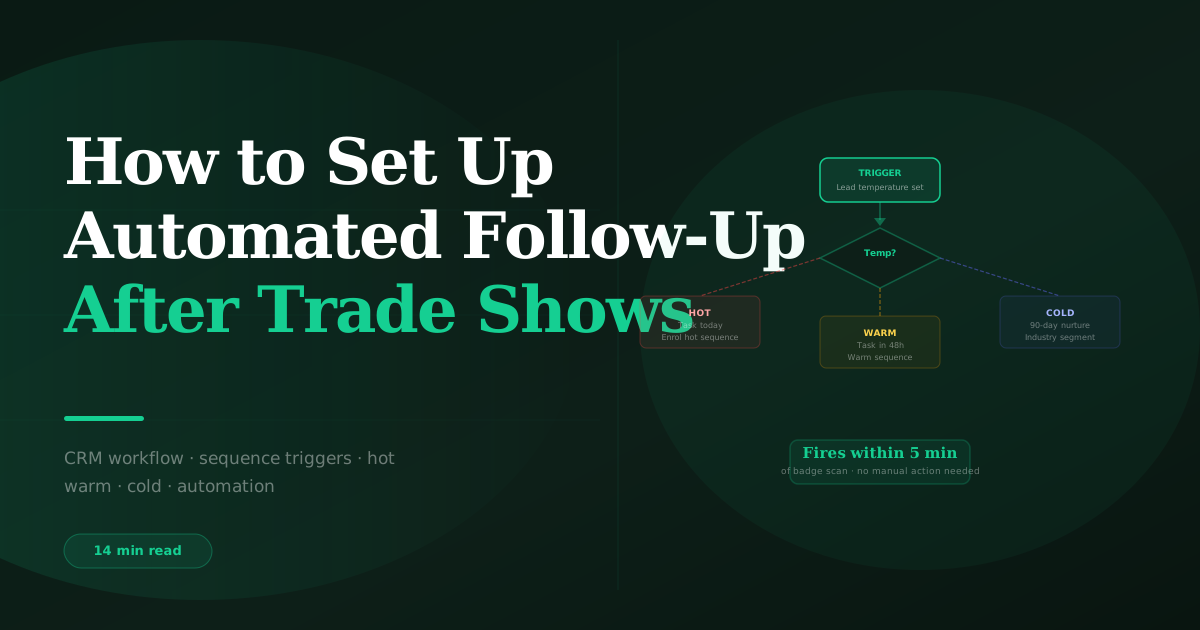
Automate trade show follow-up by configuring three CRM workflows triggered by lead temperature at the moment BoothMaven syncs each capture: a Hot workflow that creates an immediate rep task and fires the same-day email sequence, a Warm workflow that creates a +48-hour task and initiates a 6-touch 45-day sequence, and a Cold workflow that immediately enrols the contact in a 90-day industry-segmented nurture sequence. No post-show manual step is required — the automation fires automatically from the temperature field BoothMaven populates at capture.
Most trade show follow-up automation fails before it starts — not because the sequences are poorly written, but because the data that should trigger them is not in the CRM until two days after the show, by which time the 24-hour follow-up window has closed for every hot lead. Automation that fires from manually imported CSVs is automation that has already missed the optimal send window.
The automation system in this guide is built on real-time CRM sync as the foundation. When a lead is captured at the booth, BoothMaven creates or updates the contact in HubSpot or Salesforce within minutes, populates all required fields — temperature, show name, voice note transcript, rep owner — and those field values trigger the three temperature workflows immediately. The hot lead email fires the same day. The warm lead task is created for follow-up the next morning. The cold lead nurture sequence begins that evening. No show needs to close, no rep needs to return to the office, and no export-import cycle needs to complete before the automation runs.
This guide gives you the exact configuration for each workflow in HubSpot and Salesforce, the email sequence structure for each tier, the field mapping required, and the engagement escalation logic that moves cold leads to warm when they engage. For the full follow-up strategy: trade show follow-up: the complete guide.
What Needs to Be in Place Before the Automation Can Run
The automation in this guide requires three prerequisites. Without all three, workflows either fail to trigger or trigger with incomplete data, producing the same manual follow-up problem you are trying to avoid.
Prerequisite 1 — BoothMaven CRM integration configured and tested
The CRM integration must be active and tested before the show opens. In BoothMaven Settings → CRM Integration, authenticate your HubSpot or Salesforce account. Then run the pre-show test: capture a test contact in BoothMaven while offline (airplane mode), restore connectivity, and confirm the contact appears in your CRM within two minutes with all field values populated correctly. If the test contact is missing any field — temperature, show name, voice note text, rep owner — debug the field mapping before the show. See HubSpot integration setup and Salesforce integration setup.
Prerequisite 2 — Email sequences built and activated
The three temperature workflows trigger email enrolment — but the email sequences they enrol contacts into must already exist in your CRM before the first show lead arrives. Build the Hot Post-Show sequence (1 email: the personalised first touch written by the rep), the Warm Post-Show sequence (6 emails over 45 days, touches 2–6 automated), and the Cold Nurture sequences (8–12 emails over 90 days, segmented by industry). These sequences are reusable across shows — build them once, activate them before each show, and update the show-specific references for each event.
Prerequisite 3 — Rep task templates configured
Hot and warm workflows create tasks for reps. The task template must include the action required, the due date, and a link to the contact record with the voice note visible. In HubSpot, task notes can include dynamic tokens that pull from contact properties — use this to auto-populate the voice note text in the task body, so the rep who opens the task sees the conversation context without navigating to a separate tab.
HubSpot Workflow Configuration — Step by Step
Required custom contact properties (create before configuring workflows)
| Property Name | Type | Populated By | Used In |
|---|---|---|---|
| Lead Temperature | Dropdown (Hot/Warm/Cold) | BoothMaven sync | All three workflow triggers |
| Event Name | Single-line text | BoothMaven sync | Show-specific workflow scoping |
| Voice Note Transcript | Multi-line text | BoothMaven sync | Task body, email personalisation |
| Capture Method | Dropdown (Badge/Card/QR/Manual) | BoothMaven sync | Attribution reporting |
| Capture Rep | Single-line text | BoothMaven sync | Task assignment |
| CASL Consent Date | Date | BoothMaven sync | Canadian contact email suppression |
Workflow 1 — Hot Lead Post-Show
Trigger: Contact is created AND Event Name = [current show name] AND Lead Temperature = Hot
Actions in sequence:
Workflow 2 — Warm Lead Post-Show
Trigger: Contact is created AND Event Name = [current show name] AND Lead Temperature = Warm
Actions: Create task for rep with 2-day due date (Normal priority). Delay 48 hours. Enrol in Warm Post-Show 6-touch sequence. Touch 1 is rep-sent using the warm template personalised from voice note. Touches 2–6 are fully automated, sending at the days specified in the sequence calendar.
Workflow 3 — Cold Lead Post-Show
Trigger: Contact is created AND Event Name = [current show name] AND Lead Temperature = Cold
Actions: Branch by Industry property to route to the appropriate Cold Nurture sequence (manufacturing, SaaS, healthcare, financial services, etc.). Enrol immediately — no task created, no rep notification. All 8–12 touches are fully automated.
Engagement escalation from cold to warm
Add a fourth workflow: Cold Lead Engagement Escalation. Trigger: Contact is enrolled in a Cold Nurture sequence AND (Email Opens ≥ 3 in last 30 days OR Email Clicks ≥ 2 in last 30 days). Actions: Remove from cold sequence. Set Lead Temperature = Warm. Create task for rep: “Previously cold lead is showing engagement — review and follow up.” Enrol in Warm sequence at touch 3 (skipping touches 1–2 since engagement has already been demonstrated).
Salesforce Flow Configuration — Step by Step
Required custom fields (create in Lead object)
| Field API Name | Type | Populated By |
|---|---|---|
| Lead_Temperature__c | Picklist (Hot/Warm/Cold) | BoothMaven sync |
| Event_Name__c | Text(255) | BoothMaven sync |
| Voice_Note_Transcript__c | Long Text Area(32768) | BoothMaven sync |
| Capture_Method__c | Picklist | BoothMaven sync |
| CASL_Consent_Date__c | Date | BoothMaven sync (Canadian leads) |
Flow 1 — Hot Lead After Show (Record-Triggered Flow)
Trigger: Lead created, Run mode: Fast Field Updates. Condition: Lead_Temperature__c = ‘Hot’ AND Event_Name__c ≠ null. Actions: Create Task (WhoId = Lead.Id, OwnerId = Lead.OwnerId, Subject = ‘Hot lead [show] — contact today’, Priority = ‘High’, ActivityDate = TODAY(), Description = Lead.Voice_Note_Transcript__c). Add Lead to active Hot Post-Show cadence via Salesforce Engage or your connected outreach tool.
Flow 2 — Warm Lead After Show
Same trigger with condition Lead_Temperature__c = ‘Warm’. Create Task with DueDate = TODAY() + 2 and Priority = ‘Normal’. Enrol in Warm sequence via cadence tool. Use a scheduled flow to send the touch-1 email at 48 hours if the rep has not sent it manually by then — set the scheduled flow to check Task Status and send if still Open.
Flow 3 — Cold Lead Enrolment
Trigger: Lead created, Lead_Temperature__c = ‘Cold’. Decision element: branch by Lead.Industry to route to the correct cold nurture cadence. For each industry branch, use the cadence API to enrol in the appropriate sequence. No task created.
CASL suppression for Canadian leads
Add a suppression check to all three flows: if Lead.Country = ‘Canada’ AND CASL_Consent_Date__c is not null AND DATEDIFF(TODAY(), CASL_Consent_Date__c) > 730 (two years), exclude from commercial email sequences. This check is a formula field evaluation in the Flow decision branch for Canadian leads. Consult qualified legal counsel for your specific CASL compliance posture — this is not legal advice.
The Email Sequence Structure for Each Tier
Hot sequence — 1 template email, rep-personalised
The hot sequence contains one email: the first touch. This email is not auto-sent — it is prepared by the automation (populated with the template and voice note data) and queued for the rep to personalise and send within 4 hours. The automation creates the draft; the rep adds the specific opener from the voice note and sends. If the rep does not send within 4 hours, the sequence sends the template version automatically as a fallback — better than no follow-up, but not as good as the personalised version.
Warm sequence — 6 emails over 45 days
Touch 1 (Day 2): Rep-personalised, references conversation. Touch 2 (Day 9): Automated, delivers relevant industry resource. Touch 3 (Day 16): Automated, industry benchmark or data insight. Touch 4 (Day 23): Semi-personal check-in from rep name (automated send). Touch 5 (Day 32): Automated, customer case study from their sector. Touch 6 (Day 45): Permission-based prompt — “Still worth a conversation?” The sequence stops on reply or meeting booked. After touch 6 with no response, move to cold nurture.
Cold sequence — 8–12 emails over 90 days
Fully automated, value-led. Send cadence: every 10–14 days. Content rotation: benchmark data → how-to guide → customer story → product feature spotlight → industry insight → re-engagement. Segmented by industry so the content is sector-specific from email 3 onwards. Full cold sequence calendar in the automated follow-up setup guide.
USA: Configure all three workflows to send emails in the recipient’s time zone, not the sender’s. HubSpot supports this via the ‘Send at a specific time in contact’s time zone’ setting in sequence scheduling. For US shows with Pacific, Mountain, Central, and Eastern attendees, this single setting prevents good emails from arriving at 5am or 11pm. The State field populated by BoothMaven badge data drives the time-zone routing.
Canada: Add the CASL suppression logic described in the Salesforce configuration section to all three HubSpot workflows as well: an enrollment suppression list of Canadian contacts where CASL_Consent_Date is more than 2 years ago. Also configure bilingual content variants in your warm and cold sequences for Quebec contacts identified by Province = ‘QC’ — a French or bilingual email to a Francophone contact at touch 3 or later measurably improves engagement rates.
BoothMaven customers who implemented the three-workflow automation system before their show calendar reported that their average time from lead capture to first follow-up email dropped from 4.2 days (manual process) to 6.3 hours (automated). Their hot lead reply rate in the 30 days following show close increased by 2.1× compared to pre-automation shows. The improvement was not from better email content — the content was the same. It was from the timing: automation ensured the first email arrived in the 24-hour window for every lead, rather than for the 30% of leads the rep managed to contact before returning to regular work.
Real-time CRM sync is the automation prerequisite — not a nice-to-have. Automation that fires from manually imported CSVs two days after the show has already missed the 24-hour window for every hot lead. Build the automation on real-time sync from BoothMaven and every workflow fires during the show, not after it.
The three-workflow structure handles the entire post-show follow-up stack. Hot workflow fires same day with rep task and email. Warm workflow fires at 48 hours. Cold workflow fires immediately with automated sequence. Together they cover every lead segment without any manual routing or sequencing decisions.
Engagement escalation from cold to warm is the long-cycle pipeline builder. Cold leads that engage with nurture content 60 or 90 days after the show represent buying cycle entries that would have been permanently missed without the cold sequence. The escalation workflow catches these signals and creates the rep task that converts a passive nurture contact into an active follow-up.
How to Measure Whether Your Automation Is Working
Configuring the three workflows is the build phase. Measuring whether they are performing correctly — and improving them over time — is the operational phase. Without measurement, automation drifts: workflows fire with stale templates, sequences accumulate outdated content, and timing settings that worked for one show format produce suboptimal results at a different venue type. The following metrics and review cadence keep the system calibrated.
Workflow health metrics (check weekly during active show season)
- Workflow enrolment rate. What percentage of new show contacts are being enrolled in a temperature workflow? Target: 100%. Any contact from a show event that is not enrolled in one of the three workflows represents a failure in either the CRM sync or the workflow trigger condition. A weekly audit of unenrolled show contacts catches these gaps before they become permanently missed leads.
- Hot lead task creation rate. Of all hot leads captured, what percentage have a same-day task created? Target: 100%. A rate below 90% indicates that some hot leads are being created without triggering the hot workflow — investigate the trigger conditions and field mapping for the non-triggered contacts.
- Time from capture to first email. The target for hot leads is same day (under 12 hours from capture to first email sent). For warm leads: 48 hours from capture. Track this metric per show. If the average time-to-first-email for hot leads is drifting above 24 hours, the automation has a gap — either the workflow is delaying or the rep is not sending the personalised email in the 4-hour window.
- Sequence completion rate. What percentage of warm leads complete all 6 touches in the warm sequence? A completion rate below 60% indicates contacts are unsubscribing or the sequence is being manually stopped mid-run. Low completion rates in the warm sequence warrant a content review — the emails may not be delivering sufficient value to justify the contact remaining subscribed.
Sequence performance metrics (review monthly)
- Open rate by touch. A healthy warm sequence has a declining open rate from touch 1 to touch 6, with a small uptick at the final permission-based touch. If open rate is flat or increasing touch-over-touch, the sequence content is unusually engaging — extract the highest-performing email as a template for future sequences. If open rate drops sharply after touch 2, the touch-3 subject line or content needs review.
- Reply rate by lead source. Compare reply rates for leads captured by badge scan, card OCR, and QR form. If badge scan leads produce significantly higher reply rates, it may be because the badge scan interaction captured qualifying context (via voice note) that QR form captures did not. This informs the capture protocol for future shows.
- Cold-to-warm escalation rate. What percentage of cold leads are escalating to warm through the engagement escalation workflow? A rate of 5–10% of cold leads escalating to warm is healthy and represents genuine long-cycle pipeline developing. A rate below 2% may indicate the cold sequence content is not engaging enough to trigger the escalation threshold. A rate above 15% may indicate the escalation threshold (3 opens in 30 days) is too low and is escalating contacts who are opening but not genuinely evaluating.
The quarterly automation review
Every quarter, review three things: whether the email templates in each sequence are still current (product features change, pricing changes, references to “upcoming” events become historical), whether the cold nurture sequences are industry-segmented for the new contacts added since the last review, and whether the engagement escalation thresholds are calibrated correctly based on the last quarter’s escalation rate. This review takes approximately two hours and keeps the automation performing at the level it was set up to achieve, rather than degrading silently as the templates age.
Configuring the Automation for a New Show — Pre-Event Checklist
Each new show on your event calendar requires a small configuration update before the automation can run correctly for that specific event. Most of the infrastructure (workflows, sequences, escalation logic) is reusable — but the show-specific fields must be updated so that contacts from Show B are not enrolled in the workflows triggered by Show A’s event name.
| Configuration Item | Where to Update | How Early |
|---|---|---|
| Event Name property value in workflow triggers | HubSpot Workflows / Salesforce Flow trigger conditions | 7 days before show open |
| Show name in email sequence templates (touch 1) | Sequence email body text | 7 days before show open |
| Calendar/time references in email bodies | All sequence templates | 7 days before show open |
| CRM integration re-authentication (if token expired) | BoothMaven Settings → CRM | 5 days before show open |
| End-to-end test: capture → CRM → workflow → task | Full system test | 3 days before show open |
| Rep assignment and routing logic review | CRM territory rules | 3 days before show open |
| CASL consent field activation (Canadian shows) | BoothMaven form settings + CRM workflow | 5 days before show open |
This configuration takes approximately 30–45 minutes per show once the infrastructure is built and the team is familiar with the process. The first time takes longer — building the workflows from scratch typically takes 3–4 hours for an experienced HubSpot or Salesforce administrator. Every subsequent show is a configuration update, not a build.
Common Pitfalls
The Four Most Common Automation Failures — and How to Avoid Them
Pitfall 1 — Stale email templates triggering workflows for a new show
The most common automation failure is a workflow firing with a template that references the previous show. “Great to connect at [Show A]” going to a lead from Show B is unprofessional and signals disorganisation. Prevention: add a mandatory pre-show template update step to your show preparation calendar, not your automation configuration. The configuration (workflows, sequences) stays; the content (show references, dates, season-specific language) is updated per event.
Pitfall 2 — Workflow enrollment conflicts when a contact attended multiple shows
A contact captured at both Show A in February and Show B in September may be enrolled in two overlapping sequences simultaneously — the cold nurture from February still running when the warm sequence from September starts. This produces a confusing multi-stream contact experience. Prevention: configure CRM workflows to check for existing active sequence enrolment before enrolling in a new one. If active, pause the existing sequence and enrol in the new one. The existing sequence is typically resumed after the new show’s active follow-up period ends (30–45 days post-show).
Pitfall 3 — Automation replacing personalisation rather than enabling it
The hot lead first email is meant to be personalised by the rep — the automation queues it and provides the template, but a human writes the specific opener from the voice note. Teams that misconfigure this as a fully automated send (auto-sending the template without rep personalisation) produce generic hot lead emails that underperform relative to manual follow-up. The automation handles the infrastructure. The personalisation is still a human task for hot leads.
Pitfall 4 — No unsubscribe mechanism in automated sequences
Every automated commercial email must include a working unsubscribe mechanism. In HubSpot, sequences include an unsubscribe link by default when sent through the Sequences tool. Marketing email sequences include the unsubscribe footer automatically. In Salesforce with Outreach or Salesloft, verify that the unsubscribe token is included in every email template before activating the sequence. For Canadian contacts, the CASL unsubscribe mechanism must process requests within 10 business days — configure your CRM’s opt-out processing to meet this deadline.
Frequently Asked Questions
Canada: Add CASL consent date suppression logic to all three workflows: contacts where CASL_Consent_Date is more than 2 years old are excluded from commercial email sequences. BoothMaven populates this date at capture for Canadian contacts. For Quebec contacts (Province = QC), configure bilingual or French content variants in warm and cold sequences — a meaningful improvement in open rates for Francophone recipients.
Conclusion
Automated trade show follow-up is not a shortcut around good sales practice. It is the operational infrastructure that makes good sales practice possible at scale. Without automation, a rep returning from a three-day show with 200 leads faces an impossible choice: deep personal follow-up for a few, or shallow follow-up for all. With the three-workflow system in this guide, hot leads receive automated task creation and same-day email within hours of capture, warm leads receive their sequence the next morning, and cold leads begin their 90-day nurture the same evening — all without the rep doing anything other than personalising and sending the hot lead first touch.
Build the workflows once. Test them before the show opens. Let them run during the show. Return to a CRM where every lead is already in the right sequence, every hot lead has a task waiting, and the only remaining manual work is the personalised first email that the system has already drafted.