

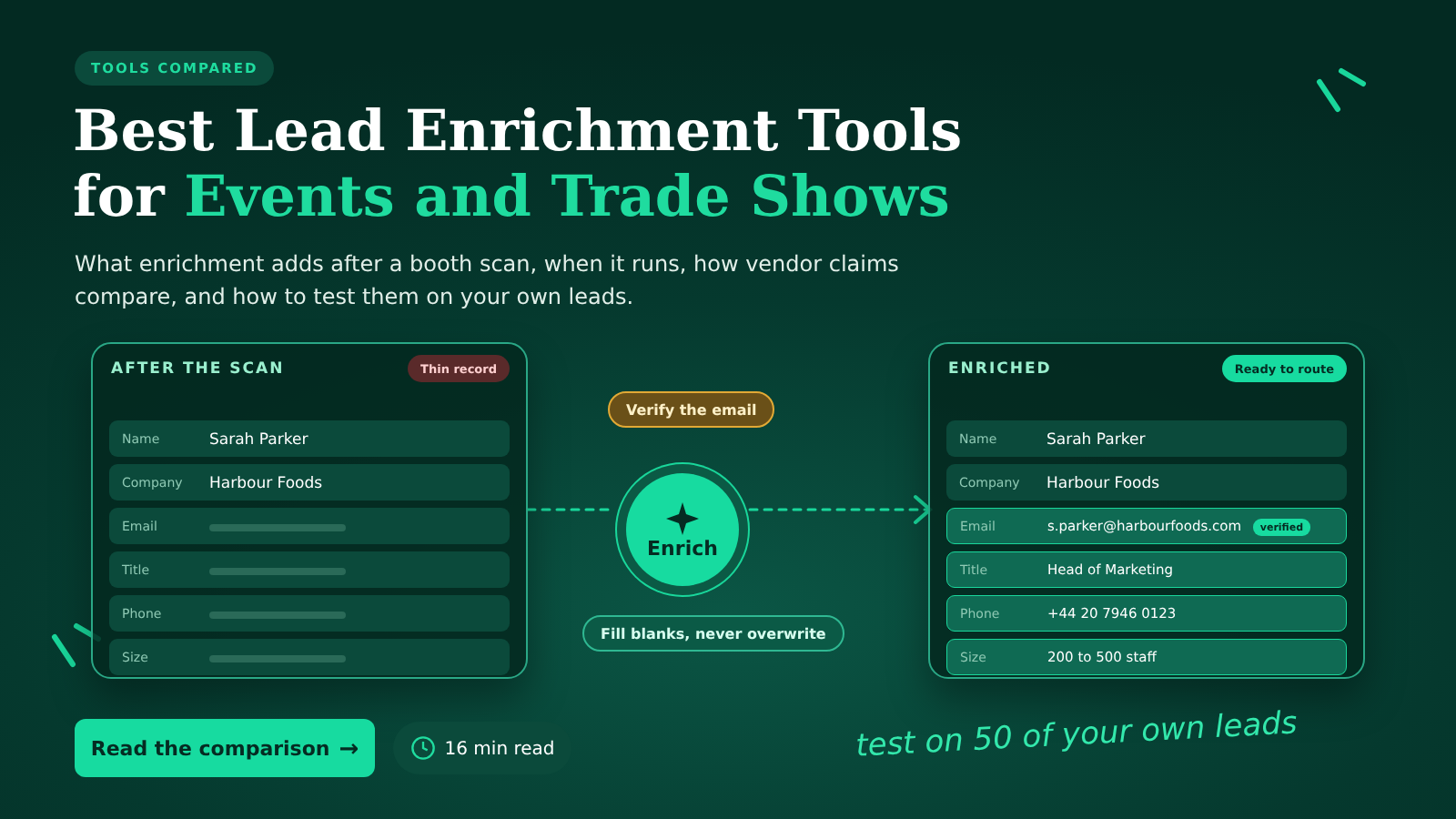
A badge scan usually gives you a name and a company. A business card gives you a few more fields, and a hurried note gives you very little. Lead enrichment tools fill the gaps afterwards: a verified email, a job title, a phone number, a company size. This guide explains what enrichment adds to a trade show lead, when it happens, how the tools differ and how to test them before you trust a vendor’s accuracy claim.
It is written for marketing operations managers, field marketers, event marketers and RevOps teams who inherit the data and have to make it usable. We compare the event tools we researched, using each vendor’s own pages and public G2 reviews, and we describe standalone data providers by category because we have not tested them. We make BoothMaven, whose enrichment is narrower than the leaders’, and we say so.What enrichment adds to a trade show lead
Enrichment appends data to a record you already have. At an event, the starting point is thin. A badge scan returns what the organiser encoded, often a name and a company. A paper card gives you printed fields that OCR may misread. A voice note gives you context and no data. Enrichment turns that thin record into something a CRM and a rep can use. Our contact enrichment page describes how BoothMaven does it, and the best lead capture apps guide shows how the tools compare overall.| Layer | Fields enrichment may add | Why it matters after a show |
|---|---|---|
| Identity | Verified email, direct phone, LinkedIn profile | You cannot follow up without a way to reach the person. See email verification |
| Role | Title, seniority, department | Routes the lead and sets the tone of the message |
| Company | Size, industry, revenue band, location | Feeds scoring and territory rules. See lead scoring |
| Technology and intent | Tools used, hiring or funding signals | Helps prioritise, though accuracy varies widely |
| Relationship | Existing account, open opportunity, past contact | Prevents a cold email to a current customer. Often comes from your own CRM |
When enrichment happens: instant, near real time or batch
The timing of enrichment affects both the rep’s experience and your data quality. Vendors use three models.- At the scan, instant. The tool looks up the lead as soon as it is captured, so the rep sees an email or a title before the conversation ends. This needs a connection, and the lookup must be fast.
- Near real time, within minutes. The lead is enriched in the background, and the record updates shortly after. This suits show floors with patchy networks.
- Batch, hours or days later. Records are enriched overnight or after the show. It is cheap and robust, and it delays follow-up.
How lead enrichment tools work: single source, waterfall and your own CRM
A single-source tool queries one database. A waterfall queries several in sequence, keeping the best result per field. A CRM-first tool checks your own records before looking outside. Each trades coverage for cost and simplicity. Vendors in this category publish impressive coverage claims. A common one is that single sources fill roughly 55 to 70 percent of a list while waterfalls reach 85 percent or more, and those numbers come from vendors that sell waterfalls (example from a vendor analysis). Treat them as marketing, not measurement. The only figures that matter are the ones you produce on your own leads, and the test later in this guide shows how. Two more ideas help you read vendor pages. First, a match is not a correct match. A tool may return an email for a person with the same name at the same company, and the person may not be your lead. Second, verification is separate from enrichment. A good tool checks that an address can receive mail before you send. BoothMaven uses MillionVerifier for that step.Why event data goes stale quickly
Business contact data does not stay accurate. A widely repeated estimate is that B2B contact data decays at roughly 22 percent a year, with some sources giving higher figures and a range of origins, from IBM-based research to vendor studies. The numbers differ, the direction does not: people change jobs, companies restructure and addresses go stale. Gartner’s often-cited estimate of the average annual cost of poor data quality is about 12.9 million dollars per organisation, a figure that appears across data vendors’ pages. For event teams, decay has a specific edge. Leads from a show may be worked over six to eighteen months, so the email you captured in March may bounce by autumn. Enrichment that runs once at capture does not fix that, and a quarterly refresh of active leads does. Plan a re-check for any lead that is still open, using the 90-day nurture plan as the schedule.Contact enrichment for trade show leads: a worked example
An example makes the layers concrete. Suppose a rep scans a badge and the organiser’s code returns a first name, a last name and a company name, and nothing else. The rep adds a voice note and two qualifiers. What does enrichment do with that?- Match. The tool looks for the person using name and company, and matches a profile. A tool that also checks your CRM may find that the company is already an account.
- Fill identity. It adds a likely work email and, where available, a phone number and a LinkedIn profile.
- Fill role. It adds a job title and seniority, so the lead can be routed to the right owner.
- Fill company. It adds size and industry, so scoring rules can apply.
- Verify. An email check confirms the address can receive mail, or flags it.
- Write. The CRM record is created or updated, with blanks filled and the source noted.
Best lead enrichment tools for events at a glance
| Tool | What the vendor states about enrichment | Timing and trigger | Watch-out |
|---|---|---|---|
| Mobly | Waterfall across 20+ providers, with the best result chosen per field; stated high email-accuracy figures | At capture; feeds booth follow-up | Reviewers mention slow or imperfect enrichment; all figures are Mobly’s |
| Captello | Enrichment from 125+ sources with a stated match rate of up to 98% | At capture | Enterprise scope; pricing not public |
| Popl | Enrichment from 20+ partners; a stated 99%+ email find rate on badge scans | At capture | Cost and customisation comments on G2 |
| Blinq | Enrichment from 25+ live sources | At capture | Event capture priced per lead |
| momencio | AI EdgeCapture enrichment that works without event APIs | At capture | Paid add-on on per-seat tiers with an annual term |
| Lodago | AI enrichment from a single scan | At capture | Scoring and content tracking not documented |
| B2Brain | Draws on your own CRM first, with ICP scoring | At capture | Two native CRMs |
| BoothMaven | Five fields (name, company, LinkedIn, email, phone) through a third-party provider; no firmographics | At capture or on reconnect | Narrower; results are indicative |
| iCapture, Zuant | Enrichment not documented in the materials we reviewed | Not documented | Check before you assume |
Enrichment depth leader
Mobly: the enrichment depth leader for Salesforce-heavy teams
Mobly’s enrichment is the deepest among the event tools we researched. It queries 20+ providers in parallel, keeps the best result per field and scores every lead against your ideal customer profile. Its native connections include Salesforce, HubSpot, Marketo, Pardot, Zoho, Pipedrive and Eloqua, and for Salesforce-heavy teams that depth is the main reason to shortlist it. It also fires follow-up email and SMS from the booth. The caveats are the ones to test. G2 reviewers mention enrichment that can be slow or not always accurate, one reports that not every lead reached Salesforce when enrichment failed, and the accuracy figures are Mobly’s own. It has no native meeting planner or digital business card. See BoothMaven vs Mobly, Mobly alternatives and our Salesforce lead capture guide.- Best for
- Salesforce-heavy teams that want enrichment depth before the record lands.
- Watch-outs
- Reviewers mention slow or imperfect enrichment; one reports leads not reaching Salesforce when enrichment failed; vendor figures are Mobly’s own.
- Pricing model
- Not published; a demo is the call to action.
Large source counts
Captello, Popl, Blinq and the large source counts
These three advertise breadth. Captello cites 125+ sources and a match rate of up to 98 percent, with SOC 2 Type 2 and ISO 27001, and sells to enterprise programmes. Popl cites 20+ partners and a 99-plus percent email find rate on badge scans, with Salesforce and HubSpot sync. Its own blog pages quote 90 to 95 percent enrichment success, so ask which measure is which, and its site announces a data partnership with Apollo. Blinq cites 25+ live sources, and an AI Notetaker, with seven native CRMs. A larger source count does not guarantee better results for your visitors. Coverage varies by region, industry and seniority, and a tool strong in North American technology contacts may be weaker in European manufacturing. Ask each vendor for its coverage in your regions, and run the blind test below. See Captello alternatives, Popl alternatives and Blinq alternatives.- Best for
- Teams that want large stated source counts and enterprise-grade breadth.
- Watch-outs
- Source counts are vendor claims; coverage varies by region, industry and seniority. Popl’s blog quotes different figures (90-95% vs 99%+), so ask which is which.
- Pricing model
- Mixed: Captello by event licence or quote; Popl by custom quote; Blinq by per-lead event pricing.
Different approaches
momencio, Lodago and B2Brain: different approaches
momencio’s AI EdgeCapture works at any event without needing the organiser’s API, as a paid add-on, alongside behavioural tracking after the show. Lodago enriches from a single scan inside a meeting-first platform; see Lodago alternatives. B2Brain checks your own CRM first and then scores leads in real time, which suits teams whose first question is whether the person is already known.- Best for
- Teams whose priority is API-free enrichment (momencio), meeting-first enrichment (Lodago) or CRM-first matching (B2Brain).
- Watch-outs
- momencio: enrichment is a paid add-on. Lodago: scoring not documented. B2Brain: two native CRMs.
- Pricing model
- Mixed: per-seat annual tiers (momencio), quoted (Lodago, B2Brain).
Narrower but included
BoothMaven: narrower enrichment, honestly described
BoothMaven’s contact enrichment covers five contact fields: name, company, LinkedIn, email and phone, supplied through a third-party provider. It does not add firmographics such as company size or revenue, so teams that score on company data will want a tool or a CRM-side service for it. Results are indicative, and we say so in our terms. It sits beside email verification, rules-based scoring and CRM sync to HubSpot and Salesforce on Essential and Business. If enrichment depth is your main purchase criterion, Mobly, Captello and Popl state more. If you want enrichment included in a booth platform with meetings and content tracking, BoothMaven is a reasonable base, and you can add a CRM-side provider for company data. See the best AI lead capture tools for the wider AI picture.- Best for
- Teams that want enrichment included inside a wider booth platform, on a published price.
- Watch-outs
- Five contact fields, no firmographics; results are indicative; narrower than Mobly, Captello and Popl.
- Pricing model
- Published month-to-month tiers; enrichment included on plans.
Standalone enrichment providers: when to buy outside the event tool
Event tools are one source, and the best lead enrichment tools for your programme may include an outside one. Standalone providers include large contact databases such as ZoomInfo and Apollo, waterfall orchestrators such as Clay, and enrichment built into some CRMs and marketing platforms. We have not tested them, and each has strengths in different regions and roles. Consider an outside provider when your event tool’s enrichment is thin, when you need firmographics or intent data, or when marketing operations already pays for one. The trade-offs are cost, setup and duplicate handling. Another credit-based service adds spend. The enrichment must be mapped into the CRM, and it must not overwrite good data. A provider that runs on a trigger, such as a new lead record, fits event workflows better than one that works only in batches. Our guides to Salesforce and HubSpot show what to check on the receiving end, and the duplicate detection workflow shows how to avoid doubled records.| Standalone option | How comparison pages describe it | Fit for event leads |
|---|---|---|
| Clay | A workflow tool that chains many data providers in a waterfall and enriches after you import a list | Strong for lists you already hold; not a scanner |
| Breeze Intelligence (formerly Clearbit) | Credit-based enrichment inside HubSpot | Useful if HubSpot is your CRM; HubSpot only |
| ZoomInfo, Apollo | Large contact databases | Broad coverage; we have not tested either |
How enrichment is priced, and what to ask
Enrichment pricing is one of the least transparent parts of the category. Some event tools include it in the plan, some charge credits per lead and some sell it as an add-on. Standalone providers usually sell credits or a subscription by volume. In our research, momencio sells AI enrichment as a paid add-on on top of per-seat tiers, Blinq prices event capture per lead, and BoothMaven includes its five-field enrichment in its plans, with published tiers from $49 a month on the pricing page. Many others do not publish prices.- Is enrichment included, or an add-on? Add-ons change the total.
- Is it metered? Credits per lead, per field or per match change the cost at busy shows.
- Do failed lookups cost credits? Some vendors charge for misses.
- What happens at the limit? Does enrichment stop, slow or bill extra?
- Is there a re-enrichment charge? Refreshing open leads may count again.
How to test lead enrichment tools on your own leads
A vendor demo uses clean examples. Your leads are messier. This test takes a morning and gives you the numbers that matter.- Pick 50 real leads from past shows: badge scans, cards and notes, across regions and seniorities.
- Record the ground truth for a sample of 20, using the company website and the person’s public profile. Note title, company size and email domain.
- Run the same 50 leads through each shortlisted tool, in a sandbox or trial.
- Measure fill rate: how many fields were returned, by field.
- Measure correctness: how many returned values match the ground truth.
- Verify the emails with an email verifier, and send a test batch to a seed list to check bounces.
- Time it: seconds per lead, and whether enrichment waits for a connection.
- Count the cost per usable record, including credits, add-ons and the time to fix errors.
How enrichment should write to your CRM
The best enrichment fails if it damages your CRM. Agree four rules before you switch it on.- Fill blanks, do not overwrite. A rep’s corrected title should not be replaced by a database guess.
- Map to fields you use. Title, seniority and company size should reach the fields your scoring and routing use, not a note.
- Record the source and date of each enrichment, so you can see how old a value is.
- Match before you create. Check whether the person already exists, to avoid duplicates. See HubSpot company-level rollup and Salesforce account rollup.
Privacy, consent and compliance for enriched leads
Enrichment adds personal data that the person did not give you at the booth. That raises obligations that vary by country. Under GDPR, for example, data obtained from a source other than the person generally brings a duty to tell them, within a reasonable time and at the latest within a month, among other conditions, and a lawful basis is needed. B2B enrichment is common, and it is still regulated. Ask each vendor where its data comes from, how it handles opt-outs and where it processes data. Keep a record of what you enriched and why, and be ready to delete on request. BoothMaven’s terms describe enrichment as supplied by a third-party provider and say the results cannot be guaranteed. Read our consent and privacy explainer, check your own policies and local law, and ask your counsel if you are unsure.Common mistakes with lead enrichment tools
- Trusting vendor accuracy figures. Test on your leads.
- Enriching bad scans. Enrichment cannot fix a misread name. Check the capture first.
- Letting enrichment overwrite good data. Fill blanks only.
- Skipping verification. A bounce hurts your sending reputation. Use the email verifier.
- Forgetting decay. Re-check open leads, and see the follow-up guide for timing.
FAQs
For depth inside an event tool, Mobly leads, with Captello, Popl and Blinq stating large source counts. For enrichment inside a booth platform, BoothMaven covers five fields. Test two or three on 50 of your own leads.
It adds fields the scan lacked, such as a verified email, direct phone, job title, seniority and company details, and sometimes technology or intent signals. It works best on top of a clean capture, and followed by email verification.
Instant or near real time suits hot leads, because a rep can act the same day, and batch suits cost-sensitive teams. Offline captures are enriched when the device reconnects. See how soon to follow up and offline mode.
Treat them as vendor claims. Source counts and match rates are published by the vendors themselves, and coverage varies by region and role. Run a blind test on 50 of your own leads, and check the emails with a verifier.
Test enrichment on your own leads. Book a 20-minute demo. We will run a short enrichment test on your leads and say plainly when Mobly or another tool is the better fit.
Book a demo →